Reinstatement estimation process
ICMSCosts can help produce reinstatement estimates by combining asset information, reinstatement driver attributes, comparable project evidence, cost normalisation, and adjustment rules.
Create reinstatement estimate
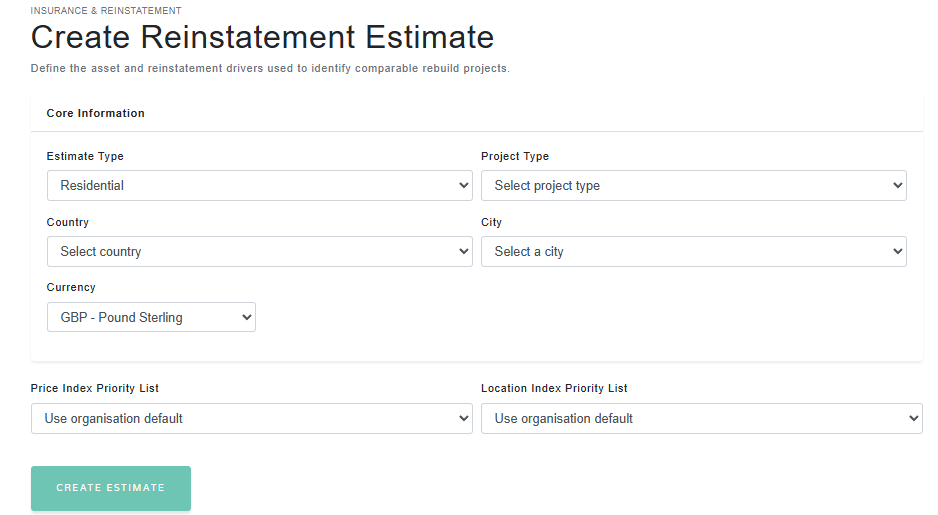
The initial screen used to define the asset, location, currency and reinstatement drivers.
1. Create the reinstatement estimate
The process begins by creating a reinstatement estimate for the asset being assessed. The estimate records the basic classification and location information needed to find relevant comparable projects.
The key information includes the estimate type, project type, country, city and currency. This information is important because it controls which projects are suitable for comparison and how costs should be normalised.
Core estimate information
| Field | Purpose |
|---|---|
| Estimate type | Identifies whether the assessment is residential, commercial, or another supported reinstatement type. |
| Project type | Defines the asset category used to select appropriate reinstatement driver attributes and comparables. |
| Country and city | Used to assess geographic relevance and apply location normalisation where required. |
| Currency | Defines the target reporting currency for the reinstatement estimate. |
| Index priority lists | Controls which inflation and location factor sources are preferred during normalisation. |
Reinstatement drivers
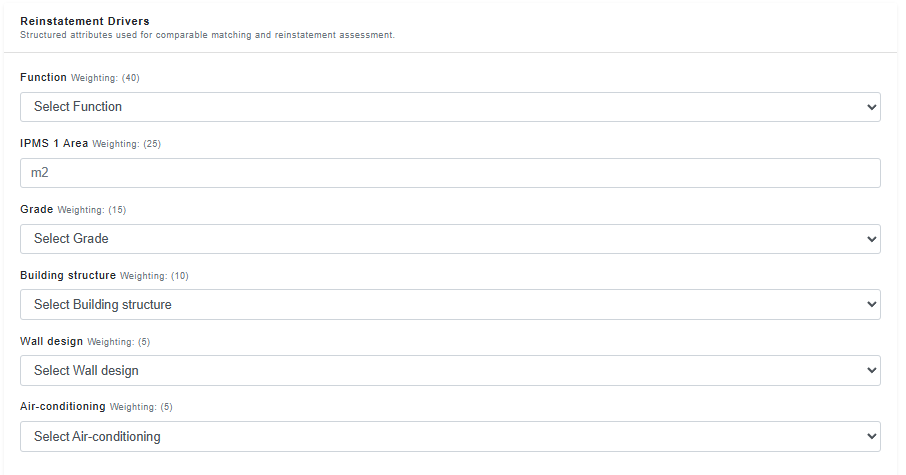
The structured asset attributes for buildings used to match the estimate against comparable projects.
2. Enter reinstatement drivers
Reinstatement drivers are structured attributes that describe the asset in more detail. These may include size, specification, construction type, complexity, occupancy, or other project-type-specific characteristics.
The platform uses these drivers to assess how closely other projects match the asset being estimated. Better attribute coverage generally improves the quality of the comparable evidence.
3. Add or find comparable projects
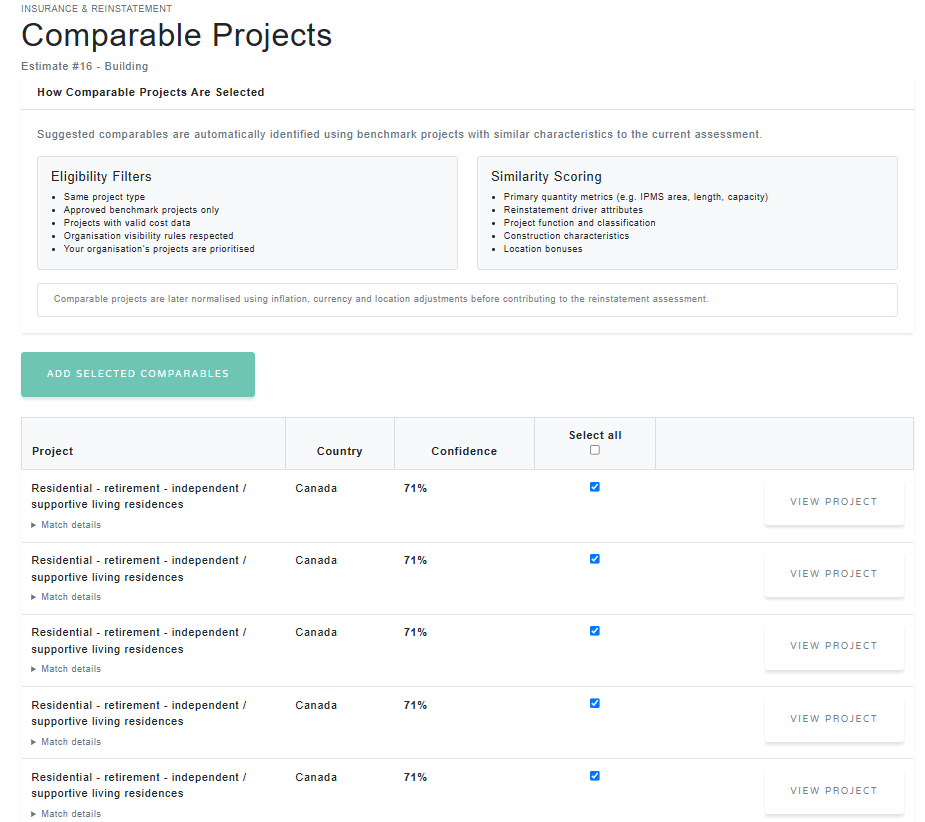
Once the estimate has been created, comparable projects can be added manually from curated datasets, selected from comparable groups, or found using the comparable discovery tools.
Comparable projects are used as evidence for the reinstatement base rate. Each comparable may be scored according to its similarity to the estimate, with weighting used to influence how much that project contributes to the final assessment.
Datasets
Add curated benchmark projects from a managed dataset.
Comparable groups
Add projects from a saved group of relevant comparables.
Comparable discovery
Search for projects that match the estimate type, location and drivers.
Saved comparable projects
Comparable projects saved to the reinstatement estimate, including similarity scores and weightings.
4. Normalise comparable costs
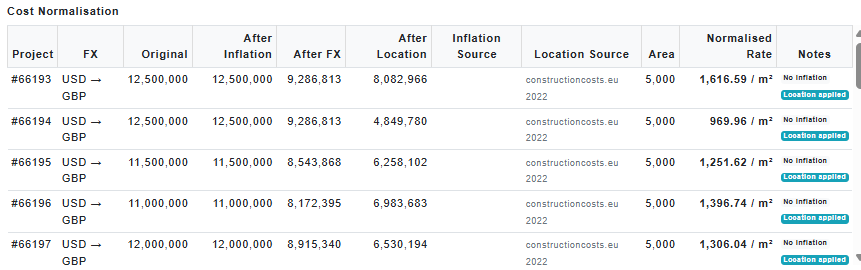
Comparable projects may come from different years, currencies and locations. Before they are used in the reinstatement estimate, their costs may need to be normalised.
ICMSCosts can apply a rebasing pipeline to convert comparable project costs onto a more consistent basis. This helps reduce distortion caused by inflation, exchange rates and location cost differences.
Cost normalisation pipeline
- Start with the original comparable project cost.
- Apply inflation rebasing where a suitable price index is available.
- Convert the cost into the target estimate currency.
- Apply location factors where suitable geographic data is available.
- Divide by the relevant project quantity to produce a normalised rate.
Cost normalisation
The calculation summary showing inflation, currency and location normalisation.
5. Calculate the reinstatement estimate
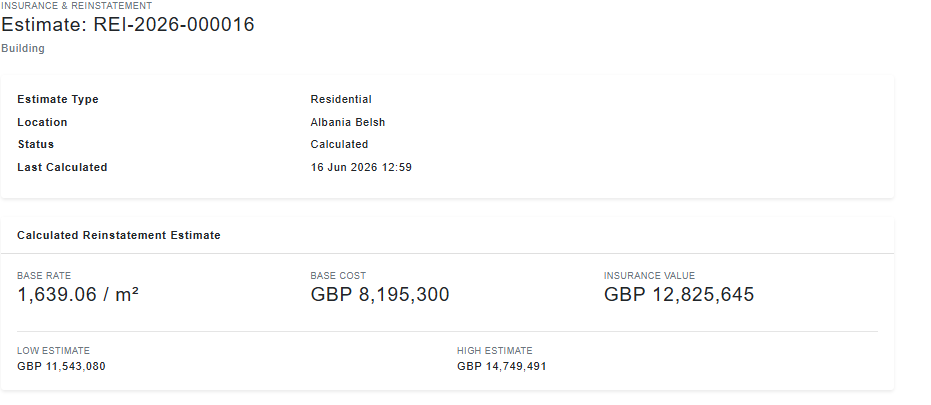
When the estimate is calculated, the platform uses the selected comparable evidence, matching scores, adjustment rules and normalised cost rates to produce the reinstatement result.
The calculated result includes a base rate, base cost, insurance value, and low/high estimate range. These values are designed to support reinstatement assessment and insurance valuation review.
Base rate
The calculated reinstatement rate, usually expressed per m².
Base cost
The core rebuild value before final insurance adjustments.
Insurance value
The final value after applying reinstatement adjustment rules.
Estimate range
A low and high range reflecting uncertainty in the assessment.
Calculated reinstatement estimate
The calculated base rate, base cost, insurance value and estimate range.
6. Review confidence
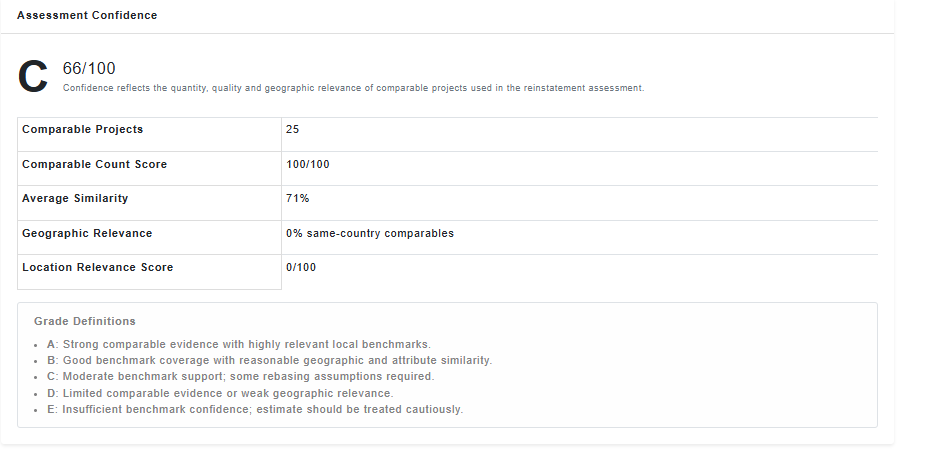
The confidence grade helps users understand the strength of the comparable evidence behind the reinstatement estimate. It reflects the quantity, quality and geographic relevance of the comparable projects used in the assessment.
Confidence grades
| Grade | Meaning |
|---|---|
| A | Strong comparable evidence with highly relevant local benchmarks. |
| B | Good benchmark coverage with reasonable geographic and attribute similarity. |
| C | Moderate benchmark support; some rebasing assumptions required. |
| D | Limited comparable evidence or weak geographic relevance. |
| E | Insufficient benchmark confidence; estimate should be treated cautiously. |
A lower confidence grade does not necessarily mean the estimate is wrong. It means the evidence base should be reviewed carefully and may require additional professional judgement, more local data, or more comparable projects.
Assessment confidence
The confidence grade and confidence score breakdown for the reinstatement estimate.
7. Review the cost breakdown and adjustments
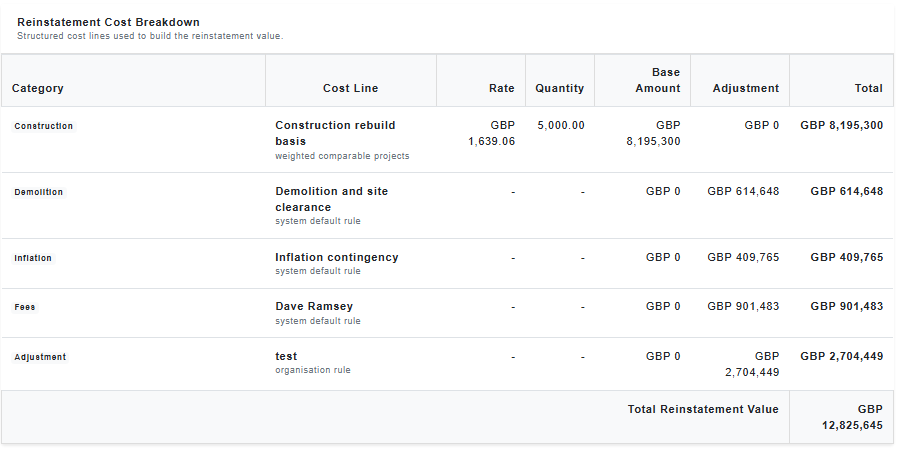
The reinstatement cost breakdown shows how the estimate has been built up from individual cost lines. Each line may include a rate, quantity, base amount, adjustment amount and total.
Adjustments may be applied using rules configured for the system, organisation, project type or estimate type. These rules help account for reinstatement-specific allowances such as professional fees, demolition, contingency, risk allowances or other insurance valuation factors.
Reinstatement cost breakdown
The structured cost lines and adjustment amounts used to build the final reinstatement value.
8. Use the calculation audit
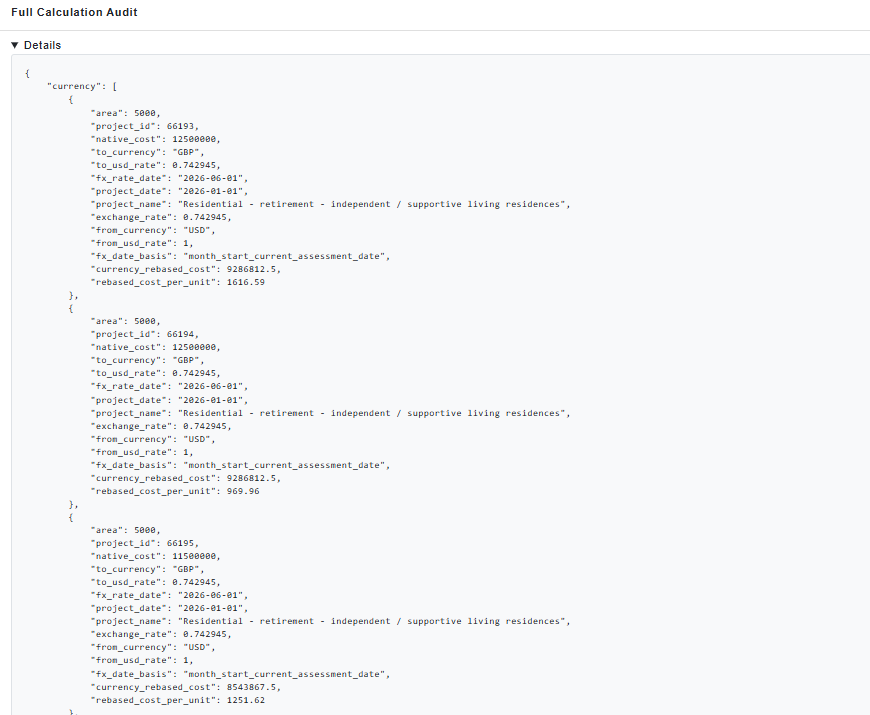
The calculation summary and audit trail provide transparency over how the estimate has been produced. This includes the comparable projects used, normalisation steps, sources applied, adjustment rules and calculation assumptions.
The audit is particularly useful when reviewing estimates internally, explaining assumptions to stakeholders, or checking why one estimate differs from another. Generally it is expected that the audit will be parsed by reporting tools, not manually read, but it can be reviewed in detail if required.
Calculation audit
The full calculation audit showing the detailed calculation data behind the estimate.
Recommended workflow
- Create the reinstatement estimate.
- Select the correct project type, location and currency.
- Enter the reinstatement driver attributes.
- Add or discover suitable comparable projects.
- Review comparable similarity scores and remove unsuitable projects.
- Calculate the estimate.
- Review the base rate, insurance value, confidence grade and cost breakdown.
- Check the calculation summary and audit before relying on the result.