Getting started with ICMSCosts
ICMSCosts helps organise project cost data in a consistent way, compare projects, and build evidence for estimating, benchmarking, and cost analysis. It also comes with thousands of pre-loaded projects and costs, so you can begin comparisions immediately.
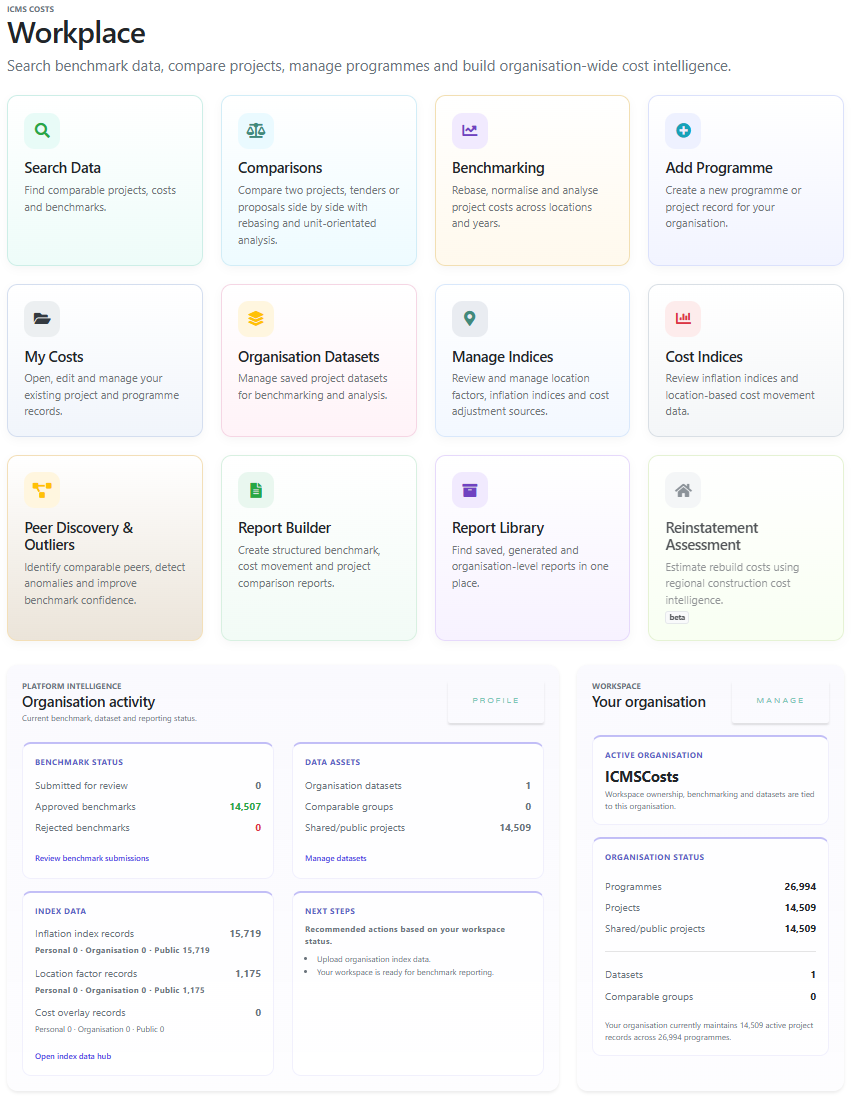
Dashboard screenshot
Main dashboard.
1. Programmes and projects
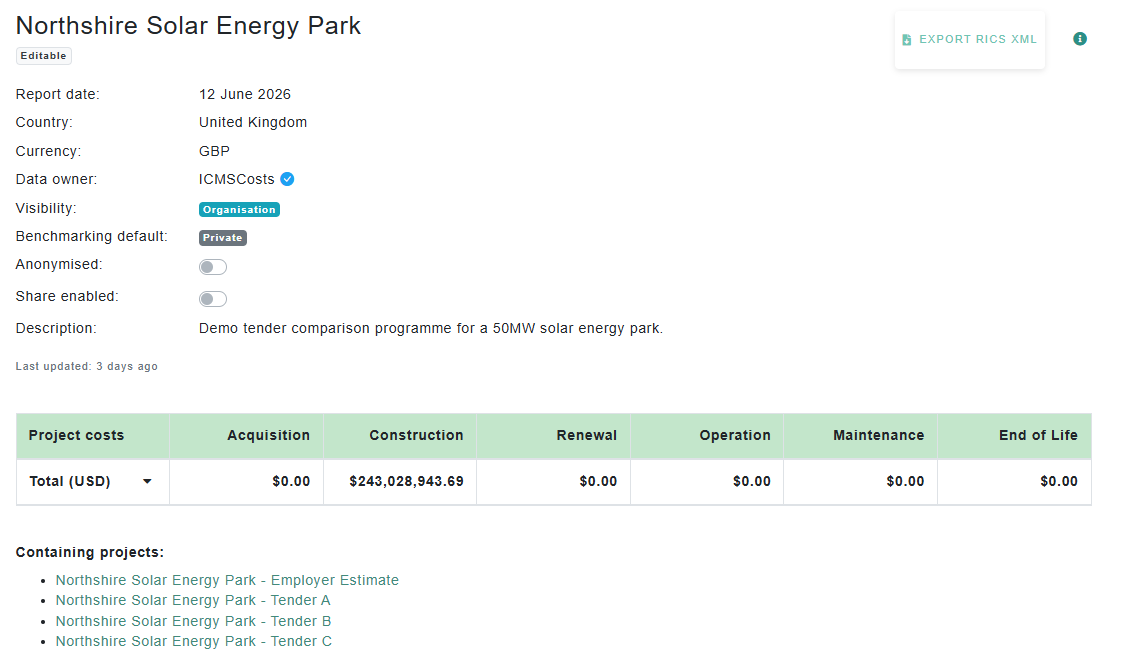
ICMSCosts cost data is built around two main concepts: programmes and projects.
A programme is a collection of related projects. You might use a programme for a government department, a client portfolio, a framework, a regional investment plan, or a private collection of projects you want to manage together.
A project is an individual asset, scheme, or development. Each project can hold its own costs, attributes, location, currency, dates, and supporting information. It is time centered around a procurement date, which is used for benchmarking and comparison, and might be an individual tender, of which there may be multiple tenders in project, or costs as an estimate, or final post-construction data.
Typical structure
- Programme: School Building Programme
- Project: Northside Primary School [tender]
- Project: Northside Primary School [pre-construction estimate]
- Project: Northside Primary School [post-construction costs]
- Project: Riverside Secondary School [post-construction costs]
- Project: Eastfield SEN Centre [post-construction costs]
Programme page
Programme and its projects.
2. Project attributes
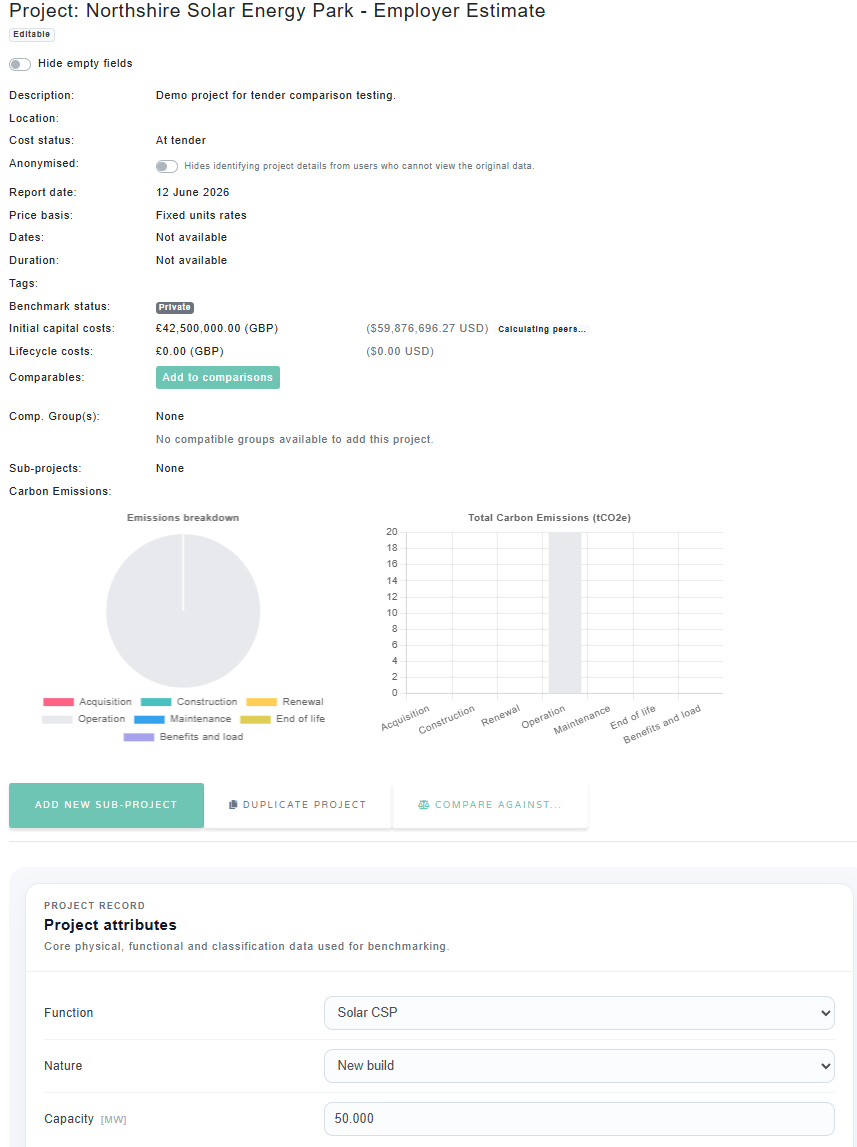
Attributes describe the physical, operational, and contextual characteristics of a project. They help users understand what a project actually represents before comparing it with others.
Typical attributes might include:
Size and capacity
Floor area, number of units, beds, rooms, pupils, seats, or other key quantities.
Location and timing
Country, city, procurement date, completion date, and project status.
Technical characteristics
Construction type, building type, specification, sustainability features, and complexity.
Project attributes
Attributes section on a project page.
3. Project costs
Costs are recorded against a structured cost classification. This allows projects to be compared consistently, even when the original source data has been prepared in different formats.
ICMSCosts follows the ICMS standard for categorising costs into broad categories, grouped into initial capital costs and lifecycle costs. This makes it easier to understand both the cost to deliver an asset and the longer-term cost of owning, maintaining, and operating it.
Level 2 cost-categories
| Category | Purpose |
|---|---|
| Acquisition costs | Land, property, purchase, and related acquisition costs. |
| Construction costs | Main works, enabling works, contractor costs, and construction delivery. |
| Renewal costs | Replacement and renewal of elements during the asset life. |
| Maintenance costs | Planned and reactive maintenance costs. |
| Operation costs | Utilities, operation, management, and running costs. |
| End-of-life costs | Disposal, decommissioning, demolition, or handback costs. |
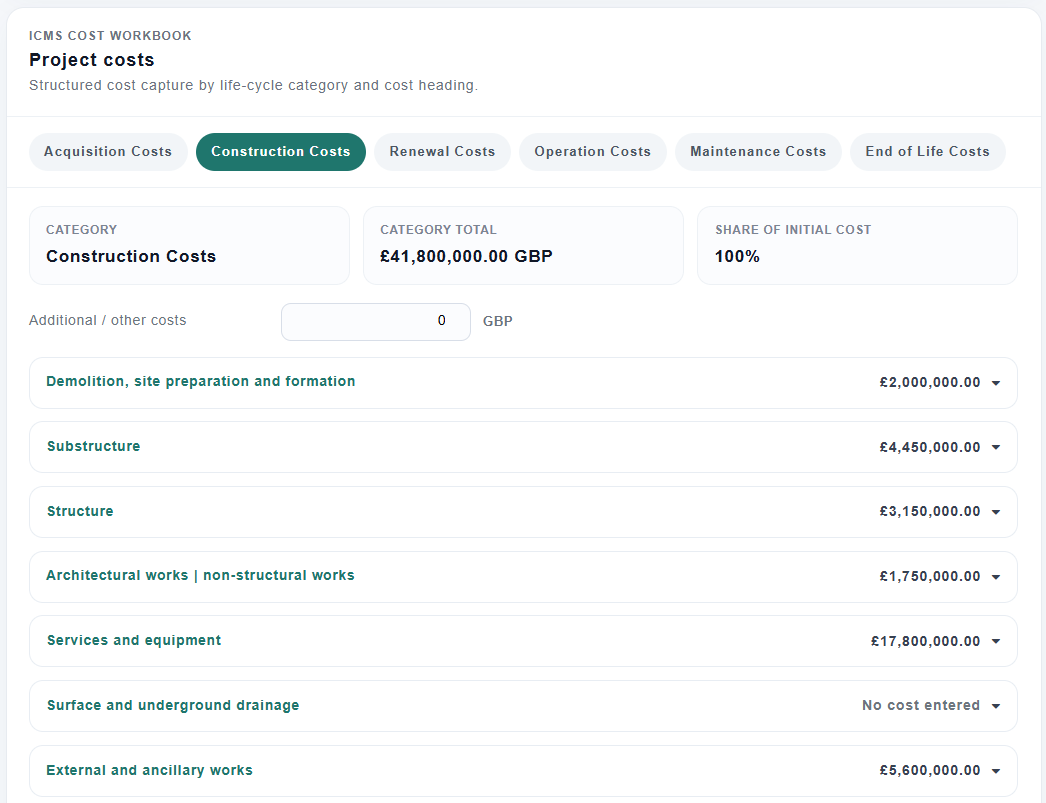
Costs are further broken down into level 3 and level 4 sub-categories, which can be used to understand the cost breakdown in more detail and compare specific cost elements across projects. Below is a screenshot of level 3 costs, under the main category of construction costs. Level 4 costs can be expanded below each level 3 cost.
Project costs
Level 3 costs under construction.
4. Comparing projects
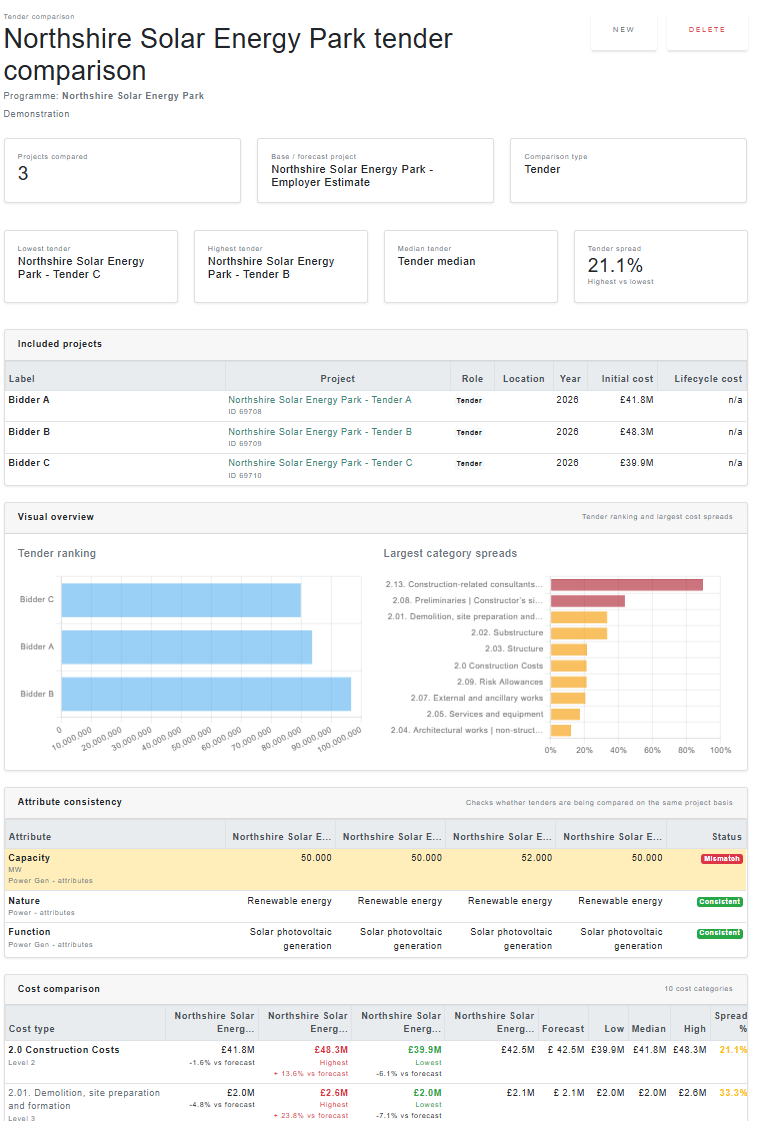
Once projects have been entered, ICMSCosts can be used to compare them against each other. Comparisons are most useful when projects have a similar type, scope, location, date, and level of data quality.
The platform can help compare projects by total cost, cost per unit, cost per square metre, cost category, location, currency, date, and selected project attributes.
Comparison screenshot
The comparison page allows you to compare projects against one or multiple projects
5. Using indices and location factors
Cost data often needs to be adjusted before comparison. A project from another country, city, currency, or time period may not be directly comparable without rebasing.
ICMSCosts supports the use of price indices and location factors to help normalise costs and has generated hundred of indices that may be used freely. This allows users to compare projects on a more consistent basis. Organisational price indices and inflation data may be uploaded and is accessible to all users working for that organisation.
Price indices
Used to adjust costs from one date to another, helping account for inflation or market movement over time.
Location factors
Used to adjust costs between locations, helping account for regional or international cost differences.
Indices and location factors
ICMSCosts default indices

6. Benchmarking projects
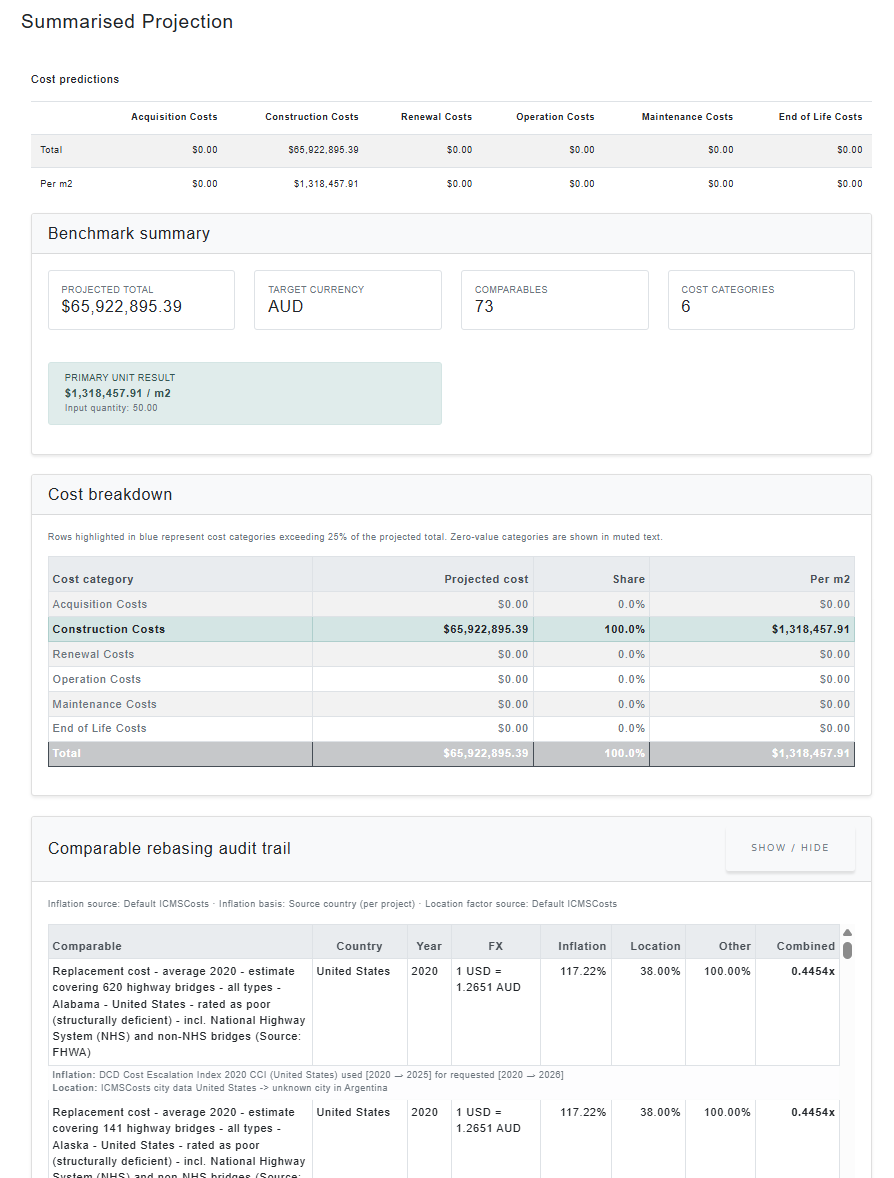
Benchmarking allows you to identify a project's potential costs based uplon similar completed or in-progress projects in order to better understand the cost drivers, risks, and opportunities. It can also help identify outliers, trends, and market movements.
ICMSCosts supports benchmarking across programmes, organisations, and datasets using structured project data, cost classifications, and project attributes.
A benchmark comparison is most useful when the selected projects are genuinely comparable. This usually means they share similar characteristics such as:
Project characteristics
- Project type
- Building or asset function
- Size or capacity
- Specification level
- Complexity
Commercial characteristics
- Location
- Currency
- Base date
- Inflation period
- Lifecycle scope
Typical benchmarking workflow
- Choose comparable projects or datasets.
- Review project attributes and scope alignment.
- Apply indices to rebase based on inflation and location factors.
- Compare overall costs and unit rates.
- Review category-level cost differences.
- Identify trends, outliers, risks, or opportunities.
Benchmarking outputs can help support:
Early estimates
Develop evidence-based estimates using comparable projects and historic data.
Cost assurance
Review whether project costs appear aligned with similar projects and programmes.
Strategic analysis
Identify trends, market movements, regional differences, and portfolio performance.
Benchmarking
The summary screen of a completed benchmarking comparison.
7. Data quality and trust
Good benchmarking depends on good data. ICMSCosts allows project data to be reviewed, organised, and compared in a structured way, but users should still consider the quality and completeness of each project before drawing conclusions. If your organisation is a verified contributor you may set the benchmarking status of projects may be verified automatically.
When reviewing a project, the following items are considered:
- Is the project type clear?
- Are the costs complete?
- Is the cost date known?
- Is the currency correct?
- Are the main project quantities entered?
- Are lifecycle costs included or excluded?
- Is the project suitable for comparison?
Recommended first steps
- Create or select a programme.
- Add a project to that programme.
- Enter the project location, type, dates, and currency.
- Add key attributes such as area, capacity, or quantity.
- Enter costs using the structured cost categories.
- Compare the project against suitable benchmarks.